Super Resolution
This tutorial is available as an IPython notebook at malaya-speech/example/super-resolution.
This module is language independent, so it save to use on different languages. Pretrained models trained on multilanguages.
This is an application of malaya-speech Pipeline, read more about malaya-speech Pipeline at malaya-speech/example/pipeline.
Dataset
Trained on English, Manglish and Bahasa podcasts with augmented noises, gathered at https://github.com/huseinzol05/malaya-speech/tree/master/data/podcast
Purpose of this module to increase sample rate.
[1]:
import malaya_speech
import numpy as np
from malaya_speech import Pipeline
import IPython.display as ipd
List available deep model
[2]:
malaya_speech.super_resolution.available_model()
INFO:root:Only calculate SDR, ISR, SAR on voice sample. Higher is better.
[2]:
| Size (MB) | Quantized Size (MB) | SDR | ISR | SAR | |
|---|---|---|---|---|---|
| srgan-128 | 7.37 | 2.04 | 17.03345 | 22.330260 | 17.454372 |
| srgan-256 | 29.50 | 7.55 | 16.34558 | 22.067493 | 17.024390 |
We modified SRGAN to do 1D Convolution and use output distance as generator loss, originally use content loss.
Load deep model
def deep_model(model: str = 'srgan-256', quantized: bool = False, **kwargs):
"""
Load Super Resolution 4x deep learning model.
Parameters
----------
model : str, optional (default='srgan-256')
Model architecture supported. Allowed values:
* ``'srgan-128'`` - srgan with 128 filter size and 16 residual blocks.
* ``'srgan-256'`` - srgan with 256 filter size and 16 residual blocks.
quantized : bool, optional (default=False)
if True, will load 8-bit quantized model.
Quantized model not necessary faster, totally depends on the machine.
Returns
-------
result : malaya_speech.model.tf.UNET1D class
"""
[3]:
model = malaya_speech.super_resolution.deep_model(model = 'srgan-256')
model_128 = malaya_speech.super_resolution.deep_model(model = 'srgan-128')
WARNING:tensorflow:From /Users/huseinzolkepli/Documents/malaya-speech/malaya_speech/utils/__init__.py:66: The name tf.gfile.GFile is deprecated. Please use tf.io.gfile.GFile instead.
WARNING:tensorflow:From /Users/huseinzolkepli/Documents/malaya-speech/malaya_speech/utils/__init__.py:66: The name tf.gfile.GFile is deprecated. Please use tf.io.gfile.GFile instead.
WARNING:tensorflow:From /Users/huseinzolkepli/Documents/malaya-speech/malaya_speech/utils/__init__.py:68: The name tf.GraphDef is deprecated. Please use tf.compat.v1.GraphDef instead.
WARNING:tensorflow:From /Users/huseinzolkepli/Documents/malaya-speech/malaya_speech/utils/__init__.py:68: The name tf.GraphDef is deprecated. Please use tf.compat.v1.GraphDef instead.
WARNING:tensorflow:From /Users/huseinzolkepli/Documents/malaya-speech/malaya_speech/utils/__init__.py:61: The name tf.InteractiveSession is deprecated. Please use tf.compat.v1.InteractiveSession instead.
WARNING:tensorflow:From /Users/huseinzolkepli/Documents/malaya-speech/malaya_speech/utils/__init__.py:61: The name tf.InteractiveSession is deprecated. Please use tf.compat.v1.InteractiveSession instead.
/Library/Frameworks/Python.framework/Versions/3.7/lib/python3.7/site-packages/tensorflow_core/python/client/session.py:1750: UserWarning: An interactive session is already active. This can cause out-of-memory errors in some cases. You must explicitly call `InteractiveSession.close()` to release resources held by the other session(s).
warnings.warn('An interactive session is already active. This can '
Load Quantized deep model
To load 8-bit quantized model, simply pass quantized = True, default is False.
We can expect slightly accuracy drop from quantized model, and not necessary faster than normal 32-bit float model, totally depends on machine.
[4]:
quantized_model = malaya_speech.super_resolution.deep_model(model = 'srgan-256', quantized = True)
quantized_model_128 = malaya_speech.super_resolution.deep_model(model = 'srgan-128', quantized = True)
WARNING:root:Load quantized model will cause accuracy drop.
WARNING:root:Load quantized model will cause accuracy drop.
Important factor
Currently we only supported 4x super resolution, if input sample rate is 16k, output will become 16k * 4.
We trained on 11025 for input sample rate, 44100 for output sample rate.
Predict
def predict(self, input):
"""
Enhance inputs, will return waveform.
Parameters
----------
input: np.array
np.array or malaya_speech.model.frame.Frame.
Returns
-------
result: np.array
"""
Let say we have a low sample rate audio,
[5]:
sr = 44100
reduction_factor = 4
[6]:
y, sr_ = malaya_speech.load('speech/44k/test-0.wav', sr = sr // reduction_factor)
ipd.Audio(y[:sr_ * 4], rate = sr_)
[6]:
[7]:
%%time
output = model(y)
ipd.Audio(output[:sr * 4], rate = sr)
CPU times: user 1min 2s, sys: 3.49 s, total: 1min 5s
Wall time: 10.9 s
[7]:
[8]:
%%time
output = model_128(y)
ipd.Audio(output[:sr * 4], rate = sr)
CPU times: user 18.1 s, sys: 1.74 s, total: 19.8 s
Wall time: 3.54 s
[8]:
[9]:
%%time
output = quantized_model_128(y)
ipd.Audio(output[:sr * 4], rate = sr)
CPU times: user 18.2 s, sys: 2.05 s, total: 20.2 s
Wall time: 3.89 s
[9]:
Below is common technique people do upsampling using interpolate,
[10]:
y_ = malaya_speech.resample(y, sr // reduction_factor, sr)
ipd.Audio(y_[:sr * 4], rate = sr)
[10]:
Try more examples
[11]:
y, sr_ = malaya_speech.load('speech/example-speaker/husein-generated.wav', sr = sr // reduction_factor)
sr_
[11]:
11025
[12]:
ipd.Audio(y[:sr_ * 4], rate = sr_)
[12]:
[13]:
%%time
output = model(y)
ipd.Audio(output[:sr * 4], rate = sr)
CPU times: user 58.1 s, sys: 3.38 s, total: 1min 1s
Wall time: 10.5 s
[13]:
[14]:
%%time
output = model_128(y)
ipd.Audio(output[:sr * 4], rate = sr)
CPU times: user 17.2 s, sys: 1.6 s, total: 18.8 s
Wall time: 3.14 s
[14]:
[15]:
y_ = malaya_speech.resample(y, sr_, sr)
ipd.Audio(y_[:sr * 4], rate = sr)
[15]:
[16]:
y, sr_ = malaya_speech.load('speech/44k/test-2.wav', sr = sr // reduction_factor)
ipd.Audio(y[:sr_ * 4], rate = sr_)
[16]:
[17]:
%%time
output = model(y)
ipd.Audio(output[:sr * 4], rate = sr)
CPU times: user 1min 1s, sys: 3.64 s, total: 1min 4s
Wall time: 11.5 s
[17]:
[18]:
%%time
output = model_128(y)
ipd.Audio(output[:sr * 4], rate = sr)
CPU times: user 18.5 s, sys: 1.83 s, total: 20.3 s
Wall time: 3.72 s
[18]:
[19]:
y_ = malaya_speech.resample(y, sr_, sr)
ipd.Audio(y_[:sr * 4], rate = sr)
[19]:
Use Pipeline
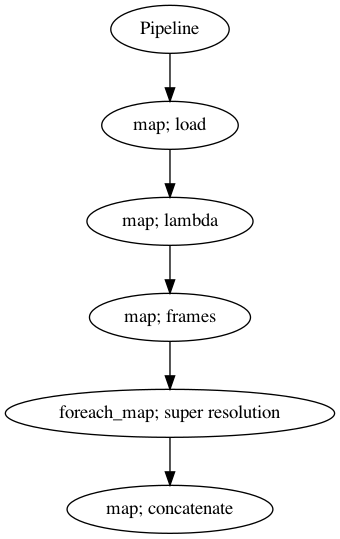
Incase your audio is too long and you do not want to burden your machine. So, you can use malaya-speech Pipeline to split the audio splitted to 3 seconds, predict one-by-one and combine after that.
[20]:
p = Pipeline()
pipeline = (
p.map(malaya_speech.load, sr = sr // reduction_factor)
.map(lambda x: x[0])
.map(malaya_speech.generator.frames, frame_duration_ms = 3000, sample_rate = sr // reduction_factor)
.foreach_map(model_128)
.map(np.concatenate)
)
p.visualize()
[20]:
[21]:
%%time
results = p('speech/podcast/nusantara.wav')
CPU times: user 20.2 s, sys: 2.52 s, total: 22.7 s
Wall time: 4.19 s
[22]:
results.keys()
[22]:
dict_keys(['load', '<lambda>', 'frames', 'super-resolution', 'concatenate'])
[23]:
ipd.Audio(results['concatenate'], rate = sr)
[23]:
[24]:
ipd.Audio(results['<lambda>'], rate = sr // reduction_factor)
[24]:
[25]:
y_ = malaya_speech.resample(results['<lambda>'], sr // reduction_factor, sr)
ipd.Audio(y_, rate = sr)
[25]: